PicKasa App
PicKasa started as an Excel sheet my partner and I used while searching for a new home. We kept adding flats we liked and tried to sort them by what mattered most, but it quickly became messy.
So I turned that spreadsheet into something simpler and more visual: a small web app that lets you add your favorite listings and rank them based on your own priorities. You decide what matters more, price, floor, sunlight, terrace, and PicKasa builds a ranking that reflects your way of choosing.
It’s basically our old house-hunting sheet, evolved into something cleaner, smarter, and a lot more fun to use.
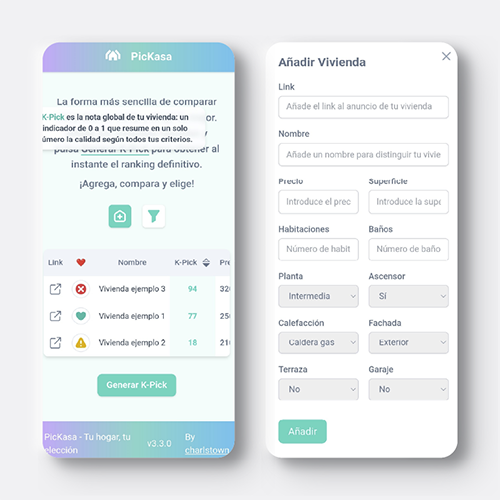
1. Usage
This section walks you through how to use PicKasa in practice, from adding homes to generating your rankings.
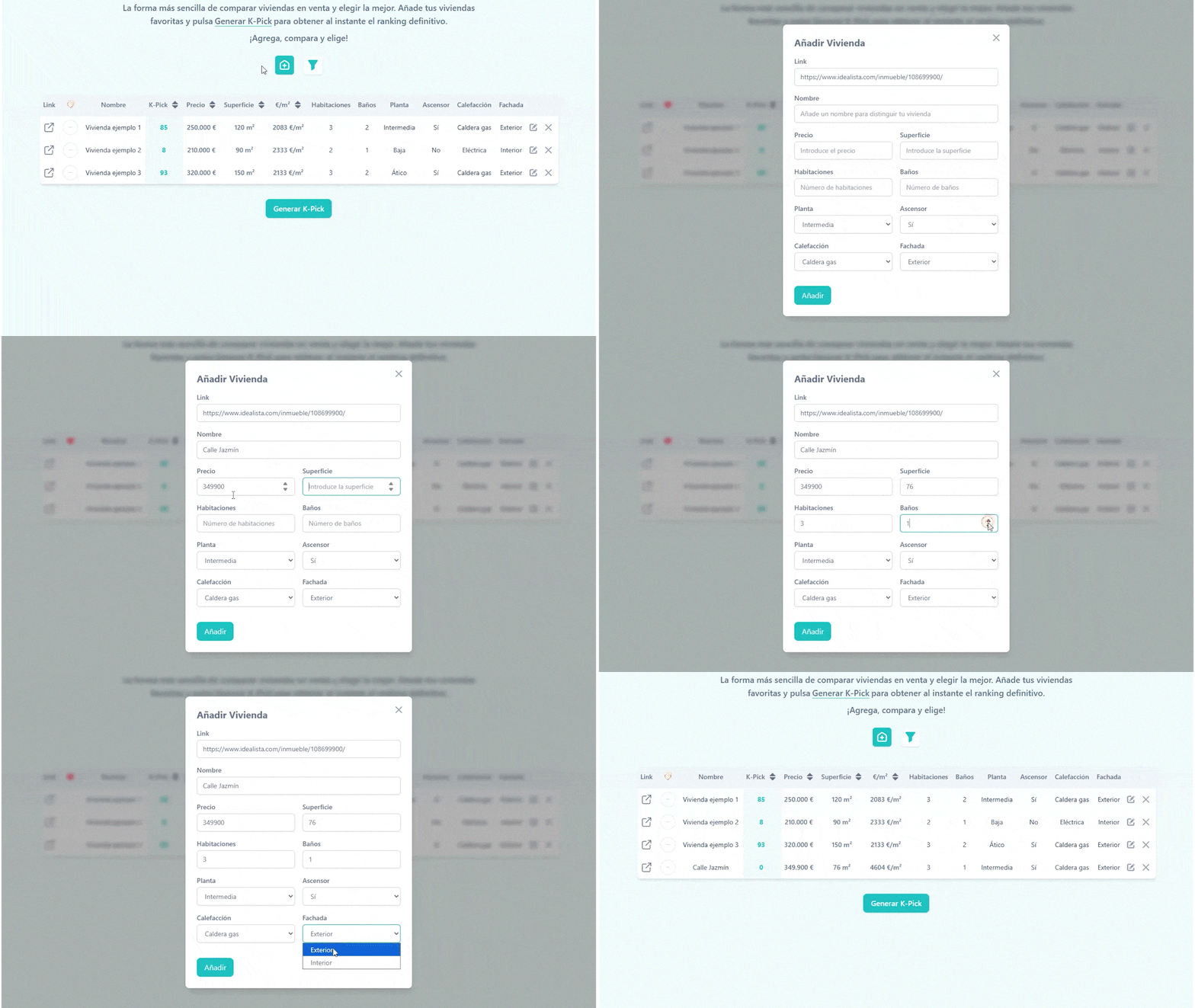
1.1 Adding new houses to the list
Easily add new homes to your list, each one adapts automatically to the active filters and parameters you’ve chosen.
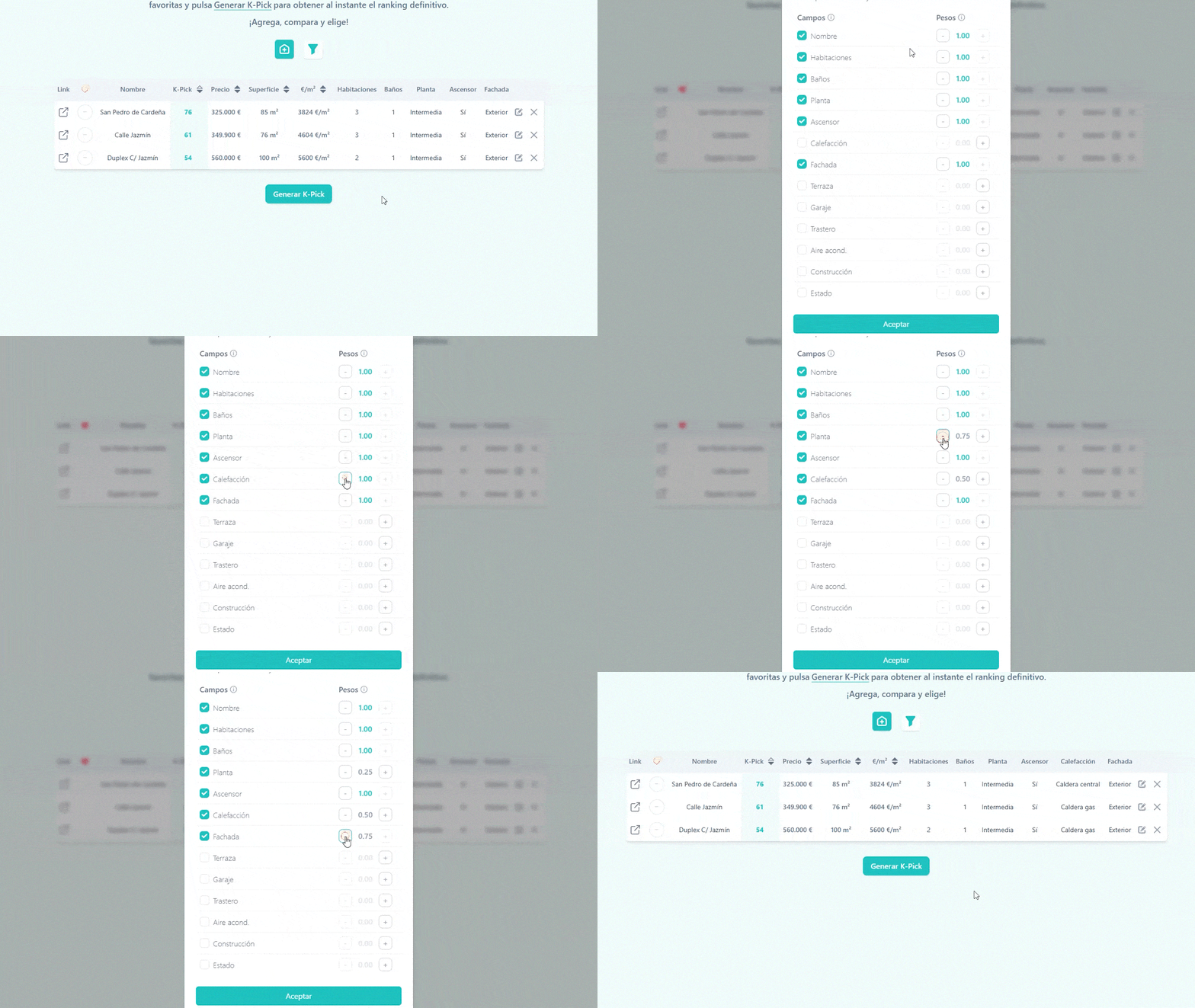
1.2 Selecting features and weights
Select which parameters matter most and adjust their weights to shape how your K-Pick score is calculated.
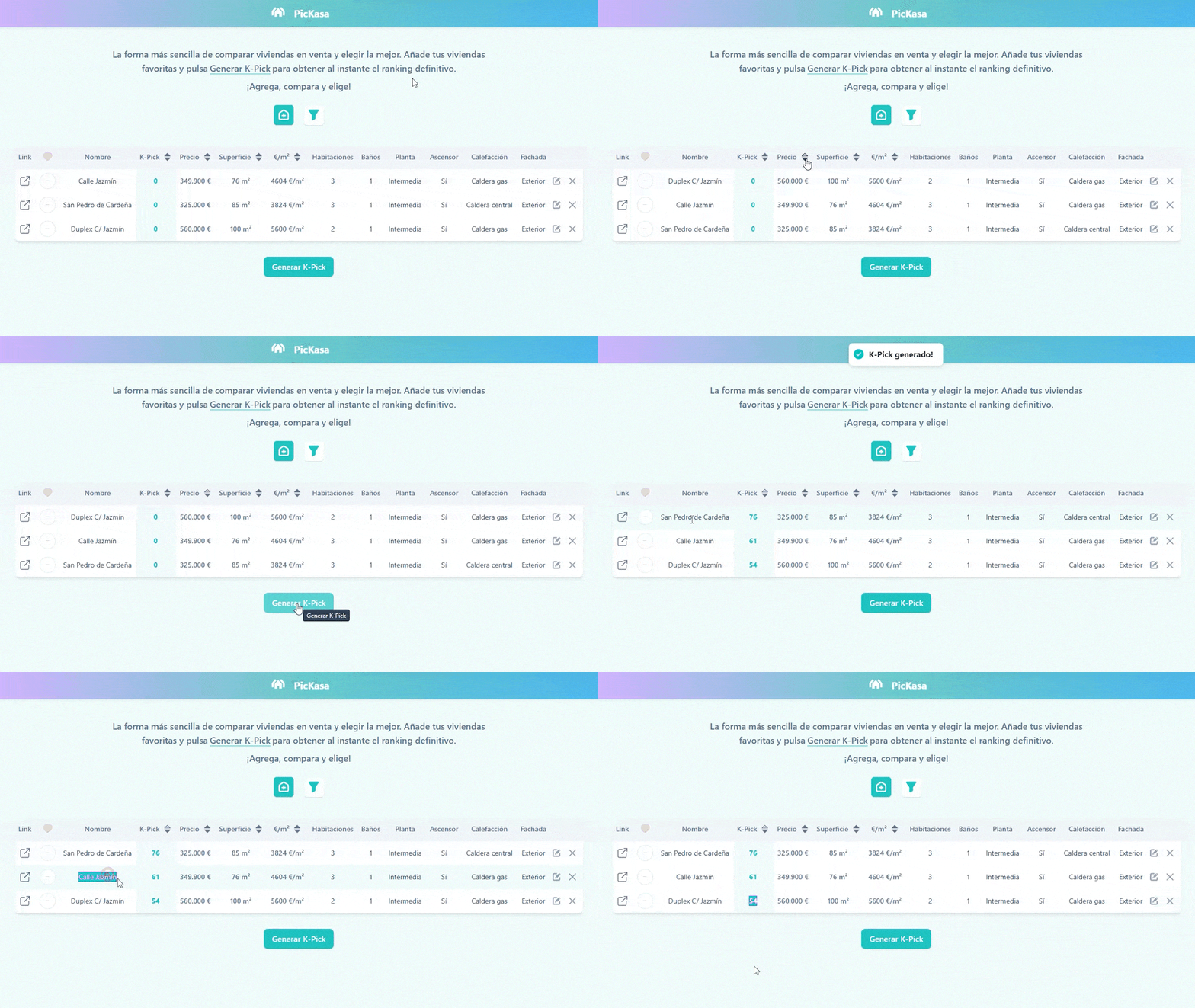
1.3 Generating de K-Pick
Once you’ve added your homes and set the filters and weights, click Generate K-Pick, each row gets its score instantly, and the list auto-sorts from best to worst match.
1.4 Other features
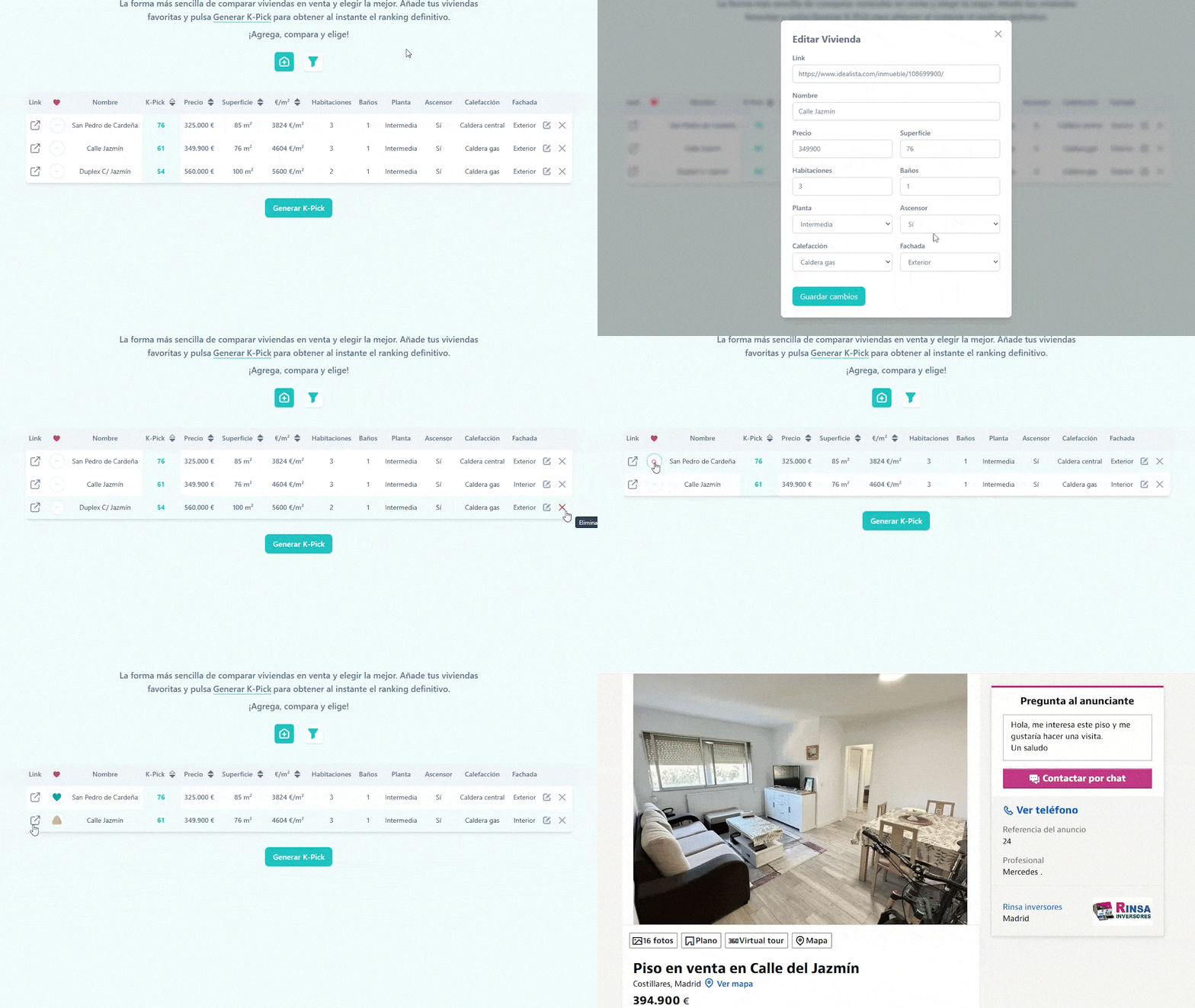
PicKasa also includes a few handy extra columns that don’t affect the K-Pick score. One lets you tag each home with quick icons, favorites, visited, pending, or discarded, so you can track your progress visually. Another column provides a direct link to the original listing, letting you jump back to the ad in one click, and you can always edit or delete a file in the table.
2. How it works
This section explains the logic and scoring model behind PicKasa so you understand how the K-Pick is calculated.
2.1 What is the K-pick
The K-Pick is a custom score (from 0 to 100) that reflects how well each home fits your personal priorities.
It’s built from a simple but consistent logic: you decide what matters most, and PicKasa translates that into numbers.
2.2 The Logic behind
PicKasa doesn’t use artificial intelligence or machine learning. The logic behind the K-Pick score is pure, simple mathematics, a weighted average.
Each home is described by several features (price, size, floor, terrace, etc.), and each feature is given a weight depending on how important it is to you. Those values are first normalized between 0 and 1, so that everything can be compared on the same scale.
Then, the final K-Pick score is calculated using this formula:
| Symbol | Meaning |
|---|---|
| \( x_i \) | Raw value of feature i (e.g., price, size, floor) |
| \( \min(x_i), \max(x_i) \) | Minimum and maximum values of that feature |
| \( w_i \) | Importance weight assigned by the user |
| \( K_{Pick} \) | Final score between 0 and 1 (later scaled to 0–100) |
| \( n \) | Total number of features considered in the ranking |
1. Selecting the features
Each column (price, floor, heating, etc.) has two key properties:
| Property | Meaning |
|---|---|
| isKpick | Whether that field should influence the ranking. |
| weight | How important it is to you (higher = more influence). |
Only the fields marked as active (isKpick = true) and with a positive weight participate in the calculation.
2. Normalization
Since every field has different scales (e.g., “price” can go from 100 000 to 500 000, while “floor” is 1 to 5), all values are normalized between 0 and 1 so they can be compared fairly.
Two types of normalization are applied:
| Type | Example | Formula (conceptually) |
|---|---|---|
| Numeric fields | Price, size, floor | (value - min) / (max - min) → gives a number from 0 to 1 |
| Categorical fields | Heating: none / gas / central | Ordered and distributed evenly between 0 and 1 |
If a field is marked as descending (for example, you prefer lower price), the scale is inverted: normalized = 1 - normalized.
3. Applying weights
Each normalized value is multiplied by the weight you assigned to that field. Then, the app calculates a weighted average:
This gives a number between 0 and 1, which is then scaled to 0–100 for readability.
PicKasa just turns your subjective preferences into a clear, visual score so you can see which homes truly fit you.
3. Architecture
PicKasa runs on a simple, serverless setup. The frontend, built with React and hosted on Vercel, handles the entire user interface. When you click Generate K-Pick, the browser sends the list of homes and weights to an AWS Lambda exposed through API Gateway. The Lambda processes the data, calculates the scores, and returns them instantly. All user data stays local, stored in the browser’s cache or cookies so there’s no database or login system involved.

3.1 The Frontend
PicKasa’s frontend is a React (Vite) single-page application deployed on Vercel. It follows a configuration-driven architecture, meaning the UI is generated from shared configuration objects rather than being hardcoded. This allows the interface to adapt to different feature priorities and form settings without requiring layout changes.
Tech Stack
| Layer | Technology |
|---|---|
| Framework | React 19 + Vite |
| Styling | Tailwind CSS |
| State | React Context + localStorage |
| Feedback | react-hot-toast |
| API | fetch() |
| Deployment | Vercel |
Core Design Principles
-
Configuration-Driven UI
Table columns, form fields, and feature definitions come from:appData.js,configForm.js, andconfigTable.js. -
Shared Config via Context
AppConfigContext.jsxprovides these config values across the app, keeping components lightweight and consistent. -
Persistent State
Homes and column settings are stored inlocalStorageviausePersistentState.js
(keys:viviendasandcolumnsState), so data remains after reloads.
3.2 The Backend
The backend is built as a serverless function using AWS Lambda, exposed through API Gateway. Its only responsibility is to receive the user’s configured data (rows and feature settings), calculate the K-Pick score, and return the updated rows back to the frontend.
Flow Overview
- The frontend sends a POST request to the API endpoint
/generate-kpick. - API Gateway receives the request and passes the payload to the Lambda function.
- The Lambda processes the data: filters relevant fields, normalizes values, applies weights, and computes the K-Pick score.
- The Lambda returns the updated rows (with
kpi) back to the frontend.
Key Components
| Component | Purpose |
|---|---|
| API Gateway | Defines the route (POST /generate-kpick) and forwards requests to Lambda |
AWS Lambda (labmda_pickasa_kpick) |
Contains the scoring logic and returns responses |
| Function URL / Endpoint | Used by the frontend to call the backend |
3.3 Data Structure
PicKasa’s data model is defined centrally through configuration files, which describe both the available features of a property and the initial example dataset. This allows the app to stay flexible: changing labels, adding attributes, or adjusting feature weights does not require modifying UI components or backend logic.
The appData array contains the schema for every field that can appear in a listing.
Each entry describes:
| Attribute | Description |
|---|---|
field |
Internal key used in the data rows |
label |
Name displayed in the UI |
dataType |
How the value should be interpreted (numeric, string, category) |
options (optional) |
Ordered list of possible values for categorical fields |
isKpick |
Indicates if this field participates in the K-Pick score |
weight |
Relative importance of the field in the score calculation |
ascending |
Defines whether higher values are better (true) or worse (false) |
Example (simplified):
{
  field: "superficie",
  label: "Superficie",
  dataType: "numeric",
  isKpick: true,
  weight: 1,
  ascending: true
}
This structure allows the UI and backend to dynamically understand how to display, interpret, and score each feature.
References
- Charlstown. (2025). PicKasa source code (frontend). GitHub.
- PicKasa. (2025). Live web app hosted on Vercel.
- Vercel. (2025). Deployment platform and global CDN hosting.
Tech Stack
- Meta. (2025). React: A JavaScript library for building UIs.
- Vite Contributors. (2025). Vite: Next generation frontend tooling.
- Tailwind Labs. (2025). Tailwind CSS: Utility-first CSS framework.
- Mozilla Developer Network. (2025). Fetch API Documentation.